
Shared Family Lists & Real-Time Collaboration
Shared lists are one of Ancora Planner's most powerful household tools. By connecting family members to the same real-time checklist, you eliminate duplicate purchases, forgotten grocery items, and frantic phone calls while running errands.
The Vital Importance of Shared Family Lists
Coordinating household needs across multiple people is notoriously prone to miscommunication. Shared lists transform how households manage shared responsibilities:
- Real-Time Grocery Shopping: When one family member is at the supermarket, another member at home can add a forgotten item (like milk or bread) to the Shopping list. The item appears immediately on the shopper's screen without needing a text message or phone call.
- Preventing Duplicate Purchases: As items are placed into the cart, the shopper taps the checkbox. Family members at home see the item checked off in real time, preventing someone else from buying the same groceries on their way home.
- Family Event & Packing Checklists: Organize family vacations, camping trips, or party preparations where every family member can see what has been packed and what remains to be gathered.
- Household Chores & Maintenance: Track shared weekend home repairs or cleaning tasks, allowing family members to claim and complete tasks collaboratively.
Configuring List Sharing
Sharing a checklist with household members takes just a few taps:
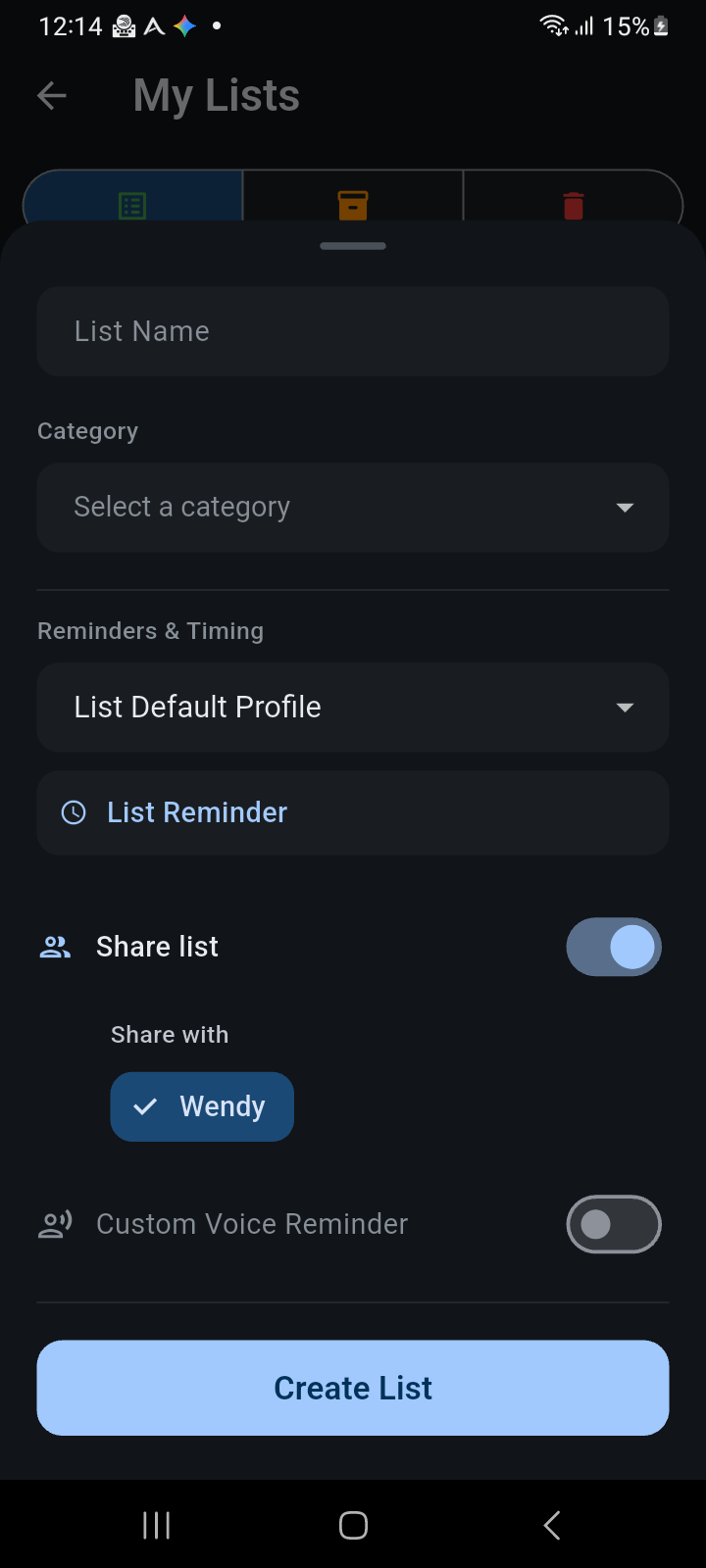
Figure 7.3: Enabling list sharing and selecting family members using interactive selection chips.
- Open the list settings by tapping the blue + button (when creating a new list) or by long-pressing an existing list card in My Lists and selecting Configure list.
- Toggle the Share list switch to the active position.
- Under the Share with section, tap the name chips of the family members you wish to include (e.g., Wendy). A checkmark appears on each selected member chip.
- Tap Create List or Save Changes to confirm.
Once shared, the list card in the My Lists overview displays a distinctive blue group icon (👥), making shared lists immediately recognizable at a glance.
Ownership vs Collaborator Roles
Ancora implements an ownership-driven security and permission model for shared lists:
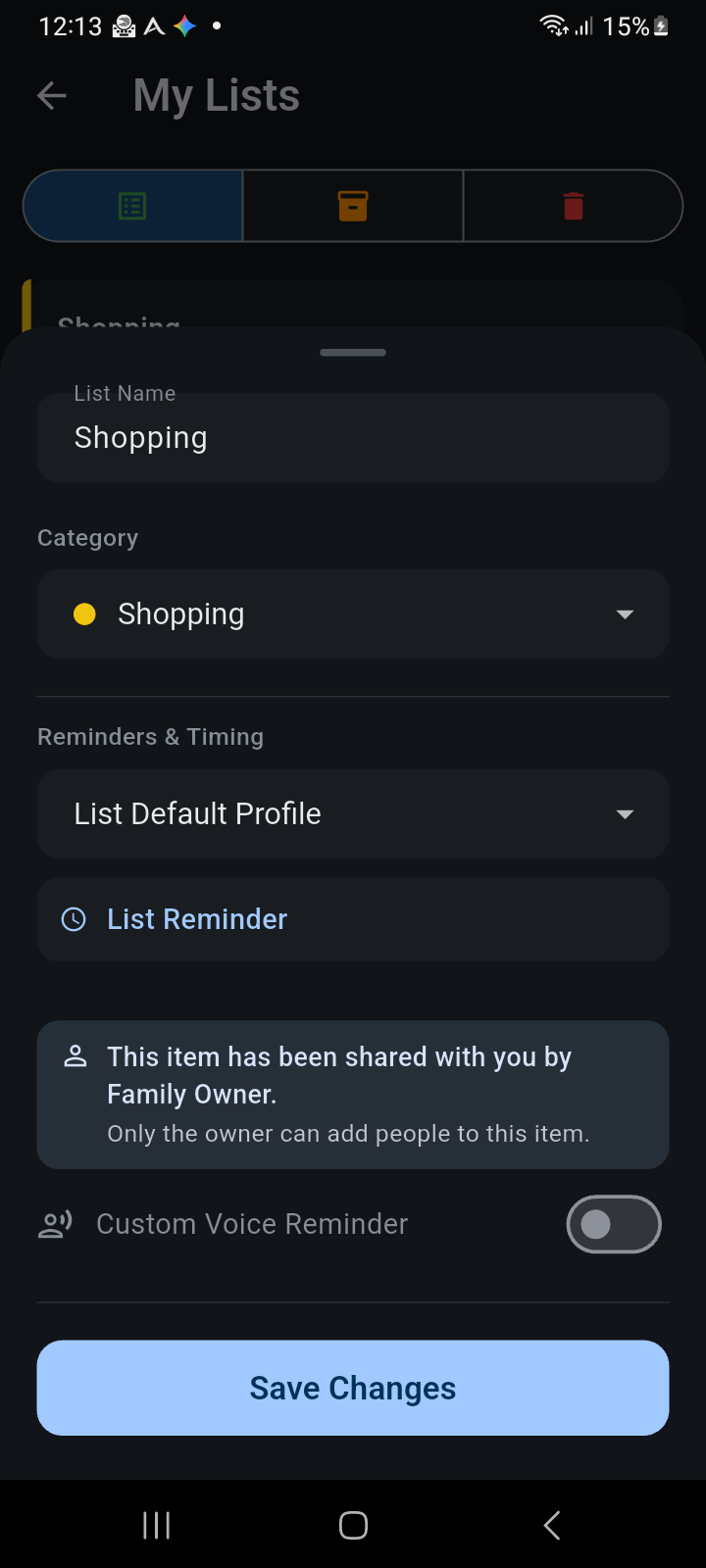
Figure 7.4: List settings view for invited members, clearly identifying the list creator and access permissions.
- List Owner (Creator): The user who creates the list retains exclusive administrative ownership. Only the owner can toggle sharing on or off, add or remove family members, or change list-wide configuration settings.
- Collaborators (Invited Members): When a list is shared with you, opening its settings displays an informational notice: "This item has been shared with you by [Owner Name]. Only the owner can add people to this item."
- Full Interactive Permissions: While only owners manage sharing membership, all invited collaborators have full collaborative permissions inside the checklist. Every member can add new items, check off completed items, reorder items by dragging, or swipe to delete items.
Live Synchronization & Offline Resilience
Ancora's background sync engine handles all updates seamlessly:
- Instant Multi-Device Sync: When connected to the internet, any item added, edited, or checked off by one user synchronizes automatically to every member's device in seconds.
- Offline Supermarket Mode: If you enter a supermarket or basement with poor cellular reception, you can continue checking off and adding items without interruption. Ancora stores all changes locally and synchronizes them automatically the moment network connectivity is restored.
Real-Time Change Alerts & Natural Voice Announcements
To keep everyone updated without requiring them to stare at their screens, Ancora includes specialized collaborative announcement handlers:
- Notification Banners: When another family member adds or checks off an item on a shared list, a system notification banner can alert you (e.g., "Wendy added Bananas to Shopping").
- Hands-Free Neural Voice Announcements: If voice announcements are enabled, Ancora can speak the change out loud using its offline neural speech engine (e.g., announcing that milk has been checked off while you are driving or preparing dinner).
- Intelligent Batch Aggregation: If a family member rapidly adds multiple items at once (such as typing four ingredients in quick succession), Ancora intelligently aggregates the changes into a single summary announcement rather than firing multiple disruptive alerts.