Frequently Asked Questions: Schedules, Alarms & Routines
Answers to the most frequent inquiries regarding alarm punctuality, Doze mode battery restrictions, routine overrides, home screen widgets, and offline neural text-to-speech voice announcements.
Reminders & Alarm Reliability
Why did my reminder alarm not sound on time?
On modern Android versions (Android 12, 13, and 14+), delayed alarms are almost always caused by operating system power-saving policies rather than the app itself. By default, Android batches inexact alarms together to conserve battery, causing alerts to trigger 2 to 15 minutes late when the device is idle.
To guarantee that your reminders fire down to the exact second:
- Navigate to Drawer → Settings → Reminder Reliability. Verify that the screen displays a green checkmark indicating Exact alarms enabled (SCHEDULE_EXACT_ALARM).
- Confirm that Current Scheduling Mode is set to exactAllowWhileIdle.
- In Android system settings under Apps → Ancora → Battery, change the setting from Optimized to Unrestricted. On Samsung devices, add Ancora to Never sleeping apps; on Xiaomi devices, set Battery Saver to No restrictions and enable Autostart.
What is the difference between a Standard Notification and an Audio Alarm?
- Standard Notification: Creates an alert banner in your Android notification shade accompanied by a short system chime or vibration. If you do not interact with it immediately, it remains quietly in the notification drawer.
- Audio Alarm: Launches a high-priority, full-screen interactive overlay with continuous audio playback. It rings relentlessly until you tap Dismiss or Snooze, ensuring you never sleep through critical medication times or wake-up calls.
Day View Timeline & Habits
What are the Sun and Moon markers on my Day View timeline?
The amber sun (☼ Wake) and dark blue crescent moon (☾ Sleep) markers represent your personalized Circadian Sleep and Wake Horizon Lines.
These markers are configured in Drawer → Personal Preferences, where you can establish distinct schedules for Weekdays (Monday through Friday) and Weekends (Saturday and Sunday). They provide an intuitive visual framework for planning daytime focus blocks without encroaching upon rest periods.
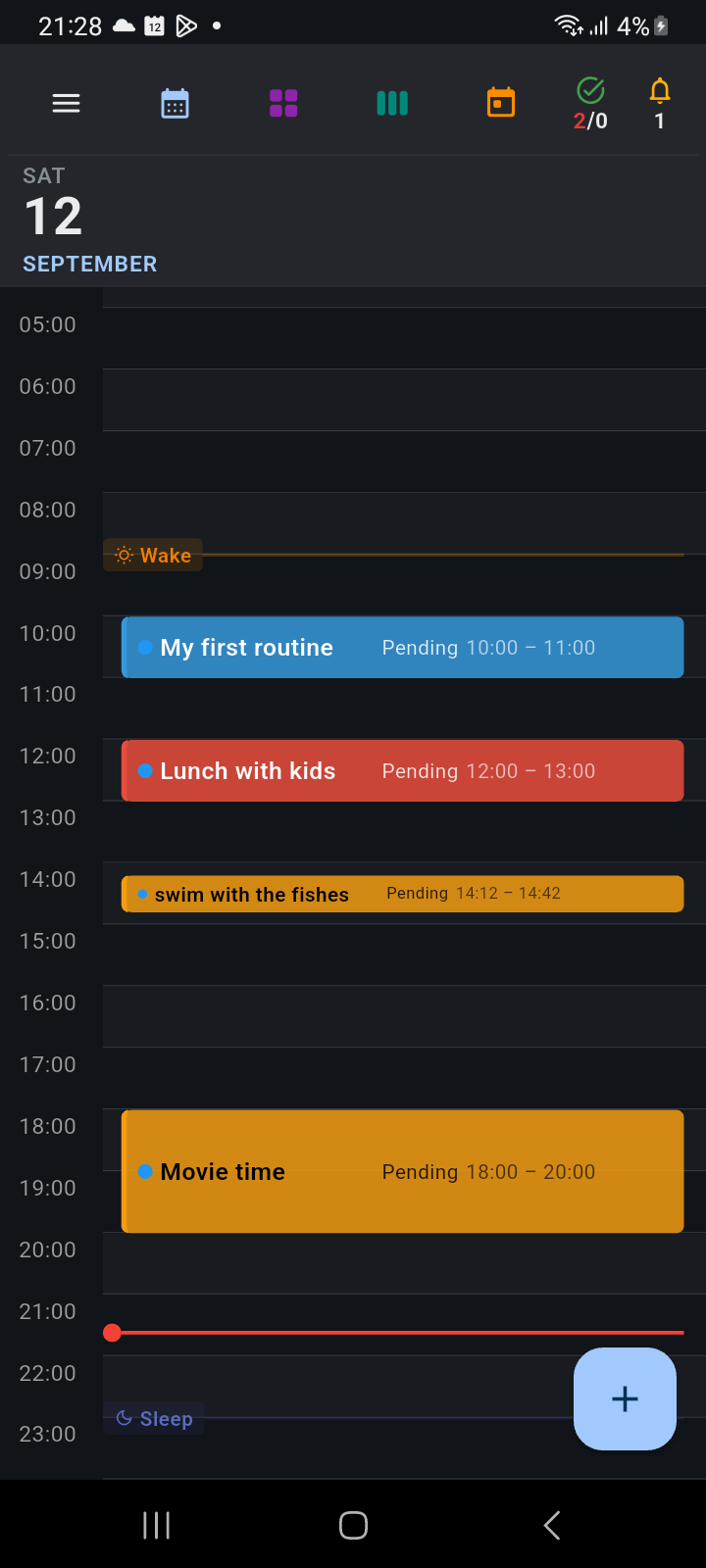
Figure 17.3: Day View timeline displaying scheduled events, circadian wake (sun) and sleep (moon) markers, and real-time current time indicator.
What happens if I skip or modify a single routine occurrence?
Ancora supports intelligent occurrence overriding. When you tap a routine on the timeline or in Task Manager and select Skip or modify its duration:
- The app asks whether to apply the change to This day only or All routine days.
- Selecting This day only alters or skips the single selected instance while leaving all future recurring cycles completely intact.
- Skipping an occurrence preserves habit tracking continuity without cluttering your timeline.
Home Screen Widget
How does the home screen widget work and how do I complete tasks from it?
The Ancora 4×2 home screen widget provides an interactive live dashboard directly on your Android launcher:
- Live Clock: Displays the current time with real-time ticking accuracy alongside today's calendar date.
- One-Tap Task Completion: You can check off pending daily tasks directly from the widget by tapping the checkbox next to the item. The item updates instantly in the local database without opening the app.
- Direct Event Inspection: Tapping any agenda event on the widget opens the corresponding event dialog directly in Ancora.
- Resizable: Long-press the widget on your home screen and drag the borders vertically to reveal additional schedule items.
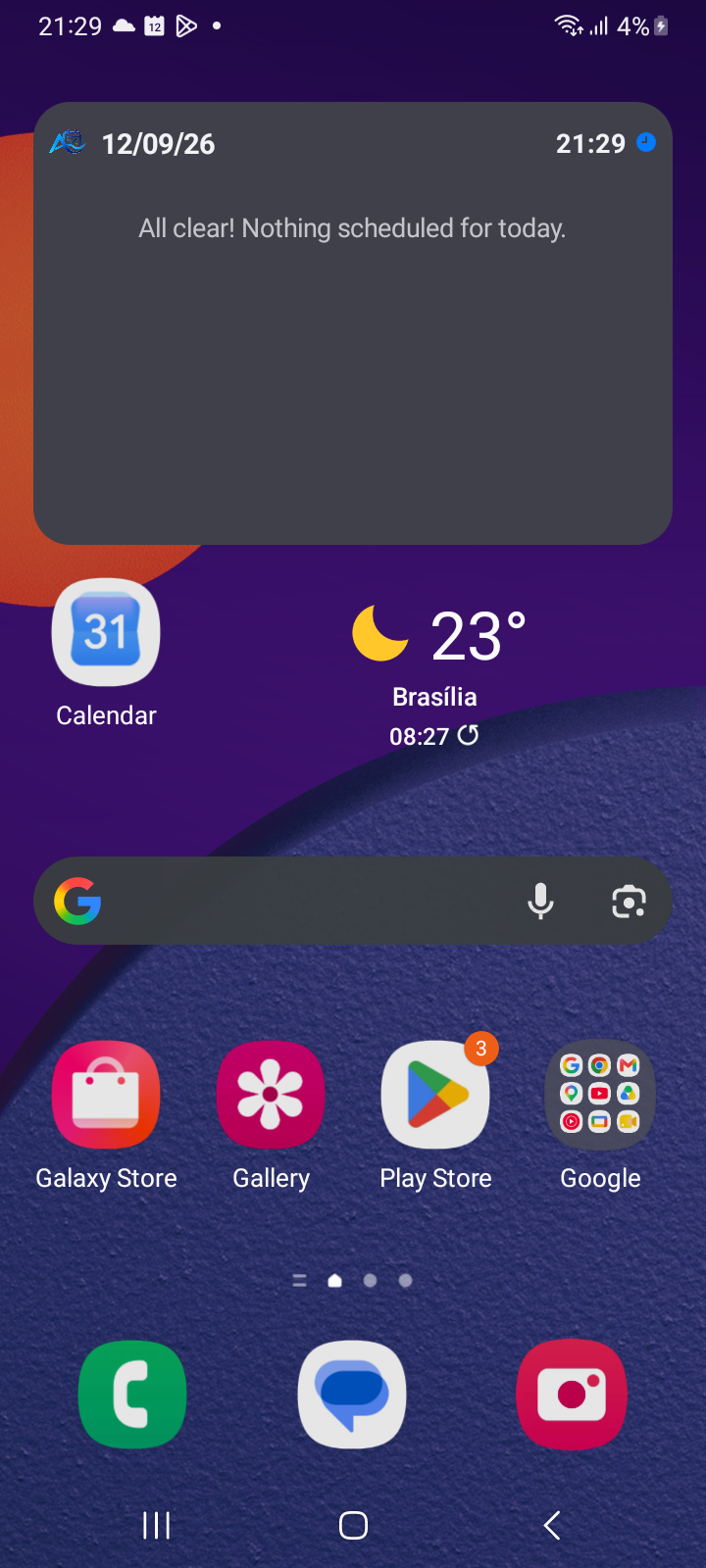
Figure 17.4: Ancora interactive home screen widget featuring real-time clock and immediate schedule visibility.
Offline Neural Voice (Piper TTS)
Does the Piper Neural Voice engine need an active Internet connection?
No. Unlike standard cloud speech services (like Google Cloud TTS or Siri) that transmit text to external data centers for synthesis, Ancora's Piper Neural Speech engine executes 100% on-device using an embedded ONNX neural runtime. Once voice models are initialized, speech synthesis works flawlessly in remote areas, during airplane travel, or when mobile data is disabled.
Can I customize the speech phrasing used for voice reminders?
Yes. Navigate to Drawer → Settings → Notifications & Announcements → Voice Customization. Here, you can select custom introductory phrases and customize dynamic speech templates using placeholders such as {title}, {time}, and {lead_time}.
Recovering Deleted Items
Can I restore a task or checklist if I deleted it by mistake?
Ancora incorporates a non-destructive soft-delete safety architecture:
- Tasks: In Task Manager, tap the Deleted accordion to view soft-deleted tasks. Tap any item and select Restore to instantly return it to your active schedule.
- Checklists: In Lists Manager, switch to the Deleted tab. Deleted checklists are retained for a 24-hour recovery window, allowing you to restore them before permanent purging occurs.
Related Articles
- Article 1.3: Adding the Ancora Widget to Your Home Screen
- Article 2.1: Navigating the Day View Timeline
- Article 6.2: Organizing Task States & Lifecycles
- Article 8.1: Creating and Managing Daily Routines
- Article 10.1: Configuring Alert Channels & Sounds
- Article 11.1: The Offline Piper Neural Speech Engine
- Article 15.1: Personal Preferences (Habits & Display)
- Article 16.1: Resolving Missed Alarms & Android Battery Optimization
Keywords: